Connect your seating workspace to your company directory.
Use Microsoft Entra ID single sign-on and configure SCIM provisioning on Business, Premium, or Enterprise. Give IT and workplace operations a shared foundation for employee data.
Card required for card signup. No charge during the trial; paid billing starts automatically unless you cancel before it ends. Trial and cancellation details
Plans from $30/month. Compare plans and limits
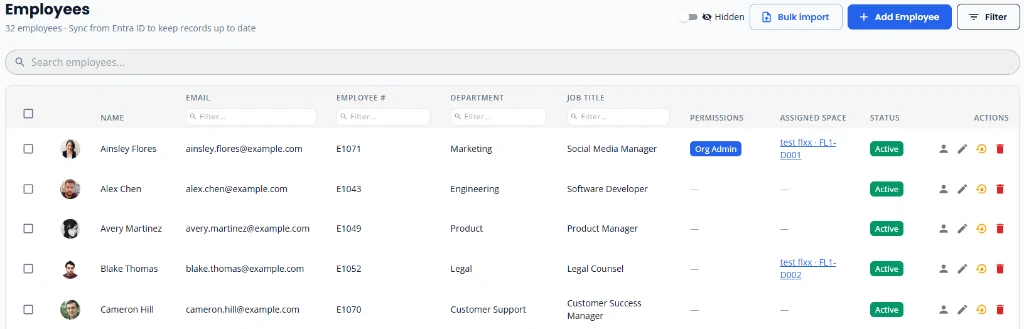
Single sign-on with Microsoft Entra ID
Configure SSO in Settings → Directory Synchronization using your Entra Client ID and Tenant ID. Register the redirect addresses for your tenant as part of your identity-provider setup.
SCIM provisioning is a separate setup
Use the SCIM API URL and generated token with your supported identity provider, such as Okta. SSO handles sign-in; provisioning keeps employee records synchronized. Confirm your provider and mapping requirements with us before rollout.
Plan your rollout with IT
Identify an owner for directory configuration, review access requirements, and test with a small employee group before expanding. Do not share client secrets, provisioning tokens, or employee exports through the public contact form.
Know the plan requirements
SSO, SCIM, and scoped REST API access are included on Business and above. Pro does not include directory synchronization. Review the pricing comparison and security information with your IT team.
Utilization reports describe assigned space and mapped capacity. An assigned desk is not evidence that someone attended the office; these reports do not measure physical presence.
Find the right starting point
Talk through your office setup
Tell us about your buildings, seating plans, or IT requirements. To discuss a demo, call us at +1 (314) 470-7700, or email us and we'll get back to you shortly.
Considering Business or Premium? Ask us about help mapping your first floor. We can discuss your floor plan, setup scope, and next steps.